Tuesday, 12 February 2013

Green Deal or No Deal?

Green Deal Basics

As detailed in a blog post last year, my home energy use and a thermal imaging survey I had done show very clearly that my house is in need of serious energy efficiency work. I was intending to do this last year but working out how to finance the work proved to be a bit of a problem as I had depleted my savings to minimise the size of the mortgage. So when the Green Deal came along, I thought it would be the ideal opportunity to get the work done.

The way the Green Deal work is meant to be extremely simple:

  1. Get an assessment done via an accredited Green Deal Assessor,
  2. Find a Green Deal Provider,
  3. Get the work done via a the provider and a Green Deal Installer,
  4. Pay back the money via your electricity bill.

As an aside on the last step, considering that the Green Deal is meant to improve energy efficiency and that most of the housing stock in the UK suffers from poor insulation, the energy use that is most likely to be affected is heating, which in turn would primarily affect gas bills. Therefore paying back via your electricity bill sounds slightly counter-intuitive.

As another aside on the last step, you pay back the money with interest (you didn't think it'd be free credit, did you?) and the interest rate on Green Deal loans is around 7.5% as explained by Which? in their guide. This is not a great rate and you may have cheaper options at your disposal, as explained by Which? as you can choose to finance the works differently. The main advantage of Green Deal loans compared to any other option is that they are attached to the property rather than yourself. The way I understand it, it means that if you sell the property, the next owners will repay the remainder of the loan on their electricity bill as they benefit from the improvements and the loan will not be subject to any credit checks against you. However, don't take my word as gospel, check with an accredited adviser, which brings me to the next step.

Finding an Assessor

The first step in the Green Deal is to find an assessor. The best way to do this is to peruse the search facility on the Green Deal Oversight & Registration Body's web site: you can search by name or postcode, residential, non-residential or both. If you search by postcode, results will be ordered based on proximity, which is very handy.

I did just that and am going down the list, calling each one of them in turn based on the assumption that I will get a much better feel for the company if I have them on the phone than if fill in an online form. I added a small tweak to this, I will not call British Gas for two reasons: I called them last year so I know what their offering is like and will actually use them as a benchmark to compare the other guys against, and I am all for giving my money to smaller businesses rather than large incumbents. So far I called five of them and got fairly varied answers, little of it being promising.

  1. When I called the first company, I got to speak to a nice lady who had an accent that was quite hard to understand. She understood what I was looking for but failed to adequately answer my questions. In particular when I asked her how they could justify charging me £150 for an assessment when British Gas was charging £99, she told me that they would not require me to go forward with them as a Provider, contrary to British Gas that would. This sounded a bit off as I seemed to remember there wasn't any condition to the British Gas assessment. Anyway, the whole conversation felt a bit dodgy and she completely failed to take any of my details or to tell me how to organise an assessment with them. In fact, I positively had the impression she wanted me off the phone.
  2. The second company was a bit more promising as the lady I spoke to knew what I wanted and said that I had to fill in their online survey and that someone would call me back. I felt that their survey was more geared towards working out how much cashback I could get on the deal than actually taking meaningful information from me but I filled it in nonetheless. Nobody has called back yet. Note that even though the cashback option is nice, this is not the primary reason I want to go through the Green Deal so I'm not sensitive to any advertising that focuses on that. Others may be.
  3. The third company I called was the first one that is a generic green energy company and that does not focus solely on the Green Deal. To the point that not only does their web site fail to display the Green Deal Approved logo, it also fails to mention the Green Deal altogether and the lady I had on the phone had no idea what I was talking about but promised to forward my details to the man who did know about this. He hasn't called me back yet. This is a shame because as far as I am concerned I may take the opportunity to have other improvements done that are not covered by the Green Deal so working with a company that has a wider scope could have been good.
  4. The fourth company I called knew what I was talking about but said that they couldn't take any booking for now because they were still waiting for some software from the government. Now, I do understand that if the government promised assessors some software or other to do their work and they are late to provide it, it will put a fly in the ointment but my understanding of the assessment is that the first thing to do is a site visit that doesn't need any special software, just someone who knows what they're talking about. Besides, based on past experience, basing your ability to take on new customers on having some software delivered by the government is not a predictable way to run your business so if you don't have a plan B it doesn't inspire much confidence: conditions are never perfect in business, deal with it or you won't have a business very long.
  5. The last company I called so far was by far the best of the lot. The lady on the phone knew what I wanted, was very knowledgeable about the Green Deal, acknowledged that I could finance the deal in different ways and that even after I had done the assessment with them I could go to a different provider. She took all my details and said that an assessor would call me to arrange a convenient time for a site visit. Nobody has called yet but it's still a lot more than any of the others were able to do.

The conclusion of all this is that if the Green Deal is to take off, the first thing would be to have companies ready to initiate new business when it comes knocking on their door. Apart from British Gas who were already eager to book me for an assessment back in November, only one of the smaller companies I called came remotely close to doing the same thing. Note to companies out there: being Green Deal Approved does not mean you can be completely devoid of business sense, get your act together and train your sales team!

Next Step

Call the next 5 companies on the list.

Sunday, 20 January 2013

Identifying spam

Refugees United

Yesterday, I participated in the Refugees United Modding Day 2013 organised by Rewired State for Refugees United. I worked on a hack that tried to implement and algorithm to identify spam and eventually also identify spammers. Our presentation was OK but not fantastic as time was short. The short of it was that by the end of the day I wasn't convinced the algorithm as coded worked so today I decided to get some statistics out of it and tweak it a little bit.

Bayesian Filters

The idea was to implement a Bayesian filtering algorithm to detect spam. This type of algorithms requires initial training using a body of existing messages comprising both spam and non-spam where you tell it which is which. By doing that, it will build a corpus of know good data and a corpus of known spam data. It will then use that stored information to score incoming messages. The resulting score is a probability between 0 and 1 of the message being spam (in practice the probability is between 0.01 and 0.99 because you can never be completely sure). After that, each time the algorithm gets its decision wrong, the user has the ability to correct it and it will learn from the correction. This is exactly the sort of algorithms that is implemented in popular email clients like Mozilla Thunderbird.

In order to train the filter, we had a file containing 5500 SMS messages, some spam, some ham. So in order to see how good the filter was, I decided to do the following:

  • Train the filter on the first few hundred messages in the file;
  • The score the remainder of the file and see for each score whether it correctly identified the message as ham or spam.

Tokenizing

The main factor that influences how such a filter works is the way the message is broken into individual tokens. The simplest algorithm is to break the message into words. Some words will be used mainly in spam messages, others mainly in innocent messages and yet others in both. Using 5% of the file for training and the remainder for scoring and applying that simple tokenizing algorithm, I got the following statistics:

  • Correct guesses: 72.03%
  • Neutral score (doesn't know if it's spam or ham): 25.68%
  • False positives (identified as spam when it is ham): 1.74%
  • False negatives (identified as ham when it is spam): 0.55%

That's not bad for a basic algorithm! So I decided to apply three additional tokenizing techniques on top of the core one and see what would happen:

  • The first technique consists in adding word pairs in addition to individual words. The logic behind this is that words like fantastic and offer may not be typical of spam on their own but the combination fantastic offer may be.
  • The second technique consists in adding the lowercase version of every word to the list of tokens in an attempt to see if weird capitalisation would catch spammers out.
  • The third one is a combination of the first two.

The results show that word pairs seem to be better than capitalisation but both together are even better.


Algorithm comparison: overall

However, this is not the whole story. The important metric is the bad stuff that ends up in the user's inbox as well as the good stuff that gets rejected. The former is composed of two parts: messages that the filter considered good when in fact they should have been caught as spam (false negatives) and messages that had a neutral score that are in fact spam (bad neutral). The latter is messages that the filter marked as spam when in fact they are good (false positives). Looking at those metrics, the result is not great.


Algorithm comparison: mistakes

False positives increase slightly with word pairs and quite significantly when introducing capitalisation variation. This may mean that a lot of legit users actually capitalise their messages like spammers. So not such a good algorithm after all.

Introducing Bias

One aspect of spam is that it is better to have false negatives than false positives. That is, it is better to have a bit of spam in the user's inbox but not block legit messages by mistake. So one typical way to do this is to introduce some bias into the algorithm to give a bit more weight to positive probabilities. Compared to the basic algorithm, it definitely cuts into false positives.


Algorithm bias comparison: overall


Algorithm bias comparison: mistakes

The Impact of Training

An interesting statistic is to see how much training the algorithm makes a difference. So I decided to compare the baseline where 5% of the file is used for training to a version where 10 of the file is used for training.


Algorithm training comparison: overall


Algorithm training comparison: mistakes

And of course, a well trained biased algorithm returns some decent numbers too when compared to the baseline.


Algorithm training and bias comparison: overall


Algorithm training and bias comparison: mistakes

Conclusion

The strength of statistical algorithms like Bayesian filtering is that it learns from the mistakes it does and it doesn't matter if spammers change their wording, the algorithm will adapt. This is demonstrated by the reasonably high rate of success reached by a very basic implementation of the technique with training on a few hundred messages.

In order to improve the efficiency of such an algorithm, there are a few options:

  • Include message meta-data such as sender and recipient details, in addition to the message text: this would also be a first step to identify spammers in addition to spam, which was one of the aims of the hack.
  • Use advanced tokenization techniques such as sparse binary polynomial hashing.
  • Use Markovian discrimination rather than Bayesian filtering.

All those improvements would come at the cost of increased complexity and processing power requirements so may not all be practical.

Sunday, 13 January 2013

for and while constructs in bash

The for construct

When you want to iterate over a list in bash, the first thing that comes to mind is to use a for loop, like this:

for f in "abc def"; do
    echo $f
done

Simple for loop

This works great when the list to iterate over is short and is composed of items that do not contain any white space. When they do, or the list is long, this construct will get into trouble. Let's demonstrate with a simple example. If I create a file with one item per line, 3 lines like this:

one
two
third line

Simple file called test

Then the first attempt at using a for loop would be:

for f in $(cat test); do
    echo $f
done

Simple for loop to read the file

The result is not quite what was expected:

one
two
third
line

Output of the for loop

You can put double quote in different places, this will not solve the problem. This is because the for construct splits items against white space and as far as it's concerned, an actual space character or a carriage return are the same and count as separators. Another limitation of the for construct is that the sub-command contained in $(...) needs to be fully executed before for can even start. If the output is large, it can run out of memory or just take a long time to get started.

The while construct

Fortunately, bash has another construct that can bypass those limitations, the while construct. It works slightly differently and needs the help of the read command.

cat test | while read f; do
    echo $f
done

A simple while example

And the result is:

one
two
third line

Output of the while loop

This works because the read command reads a full line and does not split on white space. Therefore the value that f is set to is a complete line in the file. The other advantage is that the pipe actually streams the output of the cat command to while and read, meaning that there is no need to wait until it's finished to handle its output. One typical use of that construct is when using the find command: with modern operating systems, file names can have spaces in them and even with a tight condition, find can return hundreds of lines of output.

Use the right tool for the job

So when should you use which construct?

  • If you are dealing with a list that can be large or where each item can contain space characters, use while;
  • If you are dealing with a short list where no item can contain a space character, you can use for.

Sunday, 20 May 2012

European Cookie Law

Yesterday, Andy Budd tweeted the following:

Wondering if the browsers are doing anything about the EU cookie law? Would be so much slicker if this could be handled at the brower level.

That got me thinking and, as I like to work out how things work, I started to ask Andy how he would see this being implemented. A few tweets later and it's obvious I need more than 140 characters to explain what is going through my mind, hence this post.

Cookie Law, What Cookie Law?

The Cookie Law is a UK law that derives from a European Directive and requires all site owners to disclose their use of cookies and allow visitors to opt in. The law came into force on 26th May last year and the ICO said at the time that it would not enforce it for the first 12 months. Those 12 months come to a close at the end of next week.

Andy's Idea

Andy's idea is to use the browser to handle this law. This is a good idea for the following reasons:

  1. Every single web site has been implementing the law their own way so using the browser would be a good way to bring a bit of standardisation to it;
  2. The browser is the agent that uses and stores the cookies created by web sites so it is the best place to enforce the choice of the user whether to opt in or not and to keep track of that choice between multiple visits.

Operational Outline

So far, so good. Then comes the question: how do you implement such a thing in the browser? At a high level, you need to do the following when visiting a web site:

  • Identify whether the web site falls under the jurisdiction of the Cookie Law;
  • If yes, then identify for each cookie presented by the web site:
    • What is that cookie used for,
    • Whether that use is covered by the exceptions detailed in paragraphs (4)(a) and (4)(b),
    • If not, ask the user for consent.

Let's take all those one at a time to see where we get to.

Jurisdiction

The first step is to identify whether a given web site is subject to the Cookie Law. In order to do this reliably, you would need a cryptographically secure token that can be linked back to a company identity, including a country. Extended Validation Certificates already offer something similar but do they contain a country code in a machine readable format? I simply don't know. And what about sites that use plain HTTP rather than HTTPS?

In all instances, you will have three possible outcome to whether the site falls under the Cookie Law: yes, no or don't know. In the first case, you also need to know what variation of the European Directive to apply. European Directives being what they are, each member country is free to implement it their own way so German law will be different from British law. Conversely, in the last case, what should the browser do? Display a warning or let you go on?

To complicate matters, there is also the question of whether cookies served by a domain other than the main site's domain, such as cookies from ad networks, fall under the main site's jurisdiction or their own domain's jurisdiction. IANAL so I have no idea what the answer is.

Finally, what would prevent a multi-national company to advertise its web site to the browser as being in a non-European jurisdiction even if they do business in Europe?

What is that Cookie for?

The next step is to identify what each cookie is used for. This could take the form of a machine readable file located at a well known URL or referenced by a link tag in the page's header. This was tried before in the form of P3P and it failed to gain traction. Any such standard would have to learn from the issues faced by P3P in order to succeed.

Once this is done, it would be a case of having a number of uses recognised as falling under the exception paragraphs while any other use would require opt in. You would then en up with three possible outcomes regarding whether user opt-in is required for any given cookie served by the web site: yes, no and don't know, the latter being the case if the web site does not provide any information for that particular cookie. This last case will be the controversial one because you can't be too stringent otherwise web sites won't have time to implement the standard but on the other hand you have to at least let the user know that a machine readable privacy use for that cookie is missing otherwise it gives an easy cop out for web sites that don't want to play fair.

Opt-in Management

Once a user has given or declined consent for particular cookies to be stored on their browsers, said browsers can remember such decisions and act accordingly next time the user visits the same web site. It would also be nice if the browser could notify the site of the user's decision so that web sites can avoid creating declined cookies altogether. This should then be accessible to the user in a similar way to saved passwords.

Do Not Track, etc.

A couple of parting thoughts:

  • How should all this interact with features like Do Not Track?
  • How can it be made flexible enough such that it can be extended the day other countries implement similar laws?

Answers on a postcard or in the comments below.

Monday, 2 April 2012

Energy Use

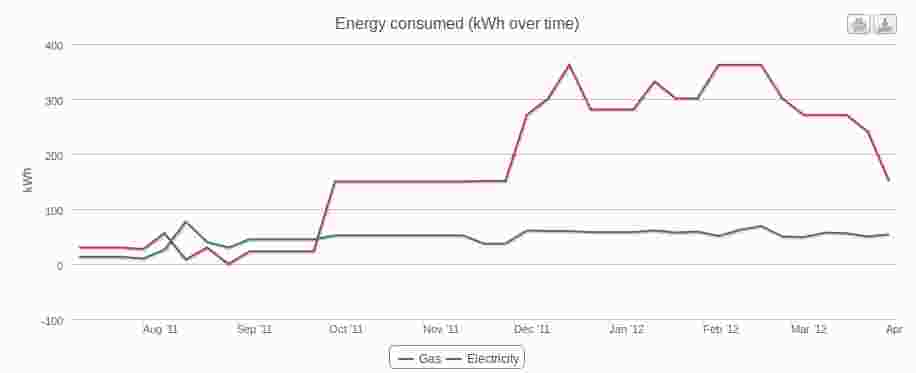
I've been using iMeasure roughly since I moved into the new house and here's what the graphs look like so far:

iMeasure Energy Usage Graph

iMeasure Energy Usage Graph

There are two immediate observations on this graph:

  • electricity use is not seasonnal,
  • gas use definitely is!

The first observation tells me that my main electricity usage is probably not lighting as it doesn't change with the amount of daylight. So it's probably down to the big electrical items such as the washing machine and the fridge. I should be able to reduce that usage the day I replace them with new efficient models. One additional tidbit of trivia: the spike at the beginning of the graph is down to the sanding machines used when I had the wooden floors of the house sanded and varnished.

The second observation tells me that I need to work on insulating the house. In fact, I had thermal imaging done recently by the excellent Sustainable Lifestyles and it showed me very clearly that I have some low hanging fruit to pick first, in particular the loft insulation (or partial lack thereof) that results in very cold spots above the bay window in the master bedroom:

Cold Spot Above Bay Window

Cold Spot Above Bay Window

And at the junction points between walls and roof, the fact that whoever fitted the insulation in the loft didn't bother to fit it properly at the bottom causes cold spots underneath:

Cold Spots Where Wall Meets Roof

Cold Spots Where Wall Meets Roof

All this should be reasonably easy to fix so that will be my project for the summer and hopefully it should shave some of that spike off the graph for next year.

Sunday, 15 January 2012

Recycling Smoke Alarms

We all know that we should have smoke alarms fitted in our homes. Those alarms can be damaged and will need replacing every ten years or so anyway. So what do you do with the old ones? Chuck them in the bin? Well, the fact that they are the subject of a best practice guide on the National Household Hazardous Waste Forum suggests that this is probably not the right solution. And indeed, looking at the back of mine, I can see why:

The back of my smoke alarm showing that it is a ionization alarm that contains a small amount of radioactive Americium 241

Ionization smoke alarms contain a small amount of radioactive material, Americium 241. Looking back at the best practice guide above, there are apparently three ways to deal with it:

  1. By a person authorised under section 13 of the Radioactive Substances Act 1993,
  2. By returning it to the manufacturer,
  3. By chucking it in the bin as long as you don't chuck in other radioactive waste and you only throw away one smoke alarm per bin bag.

Option 3 doesn't sound like recycling, while I don't know anybody who can help me with option 1. So that leaves option 2. As I've got the manufacturer's details on the back of the alarm, and their address is confirmed on their web site, that smoke alarm is going to find itself put into a jiffy bag, back to where it came from.

Note that there is another type of smoke alarms: photoelectric ones. They do not contain any dangerous material so are probably safer to dispose of. However, they are geared to detect different types of fires so for maximum protection you should have a combination of both photoelectric and ionization alarms.

For more questions on recycling stuff, have a look at the Recycle This web site.

Update

As very sensibly pointed out by Earth Notes, there may be an even easier way to deal with them: under the WEEE Directive, you can probably just give the old one to the retailer when you buy a new one.

Friday, 13 January 2012

Yodel redefines the word Safe while John Lewis redefines Eco-Friendly

Last week-end I visited the John Lewis web site and bought a couple of Buiani folding chairs. I was advised that they would be delivered within 7 days via a standard delivery service, as opposed to the specialist delivery service you get when you buy larger items and who are very good.

So when I came back home on Wednesday night, I found a very large (more on that later) cardboard box outside my front door and in the letter box was this delivery notice:

Yodel delivery notice

Yodel delivery notice

You will note how they checked the a safe place box. They actually left the parcel outside my front door. Luckily I live in a relatively safe place so theft is unlikely. On the other hand, leaving an unprotected cardboard box outside, in London, in January, with something inside that may suffer from getting wet strikes me as a tad optimistic. Or did check the weather forecast before leaving the box outside?

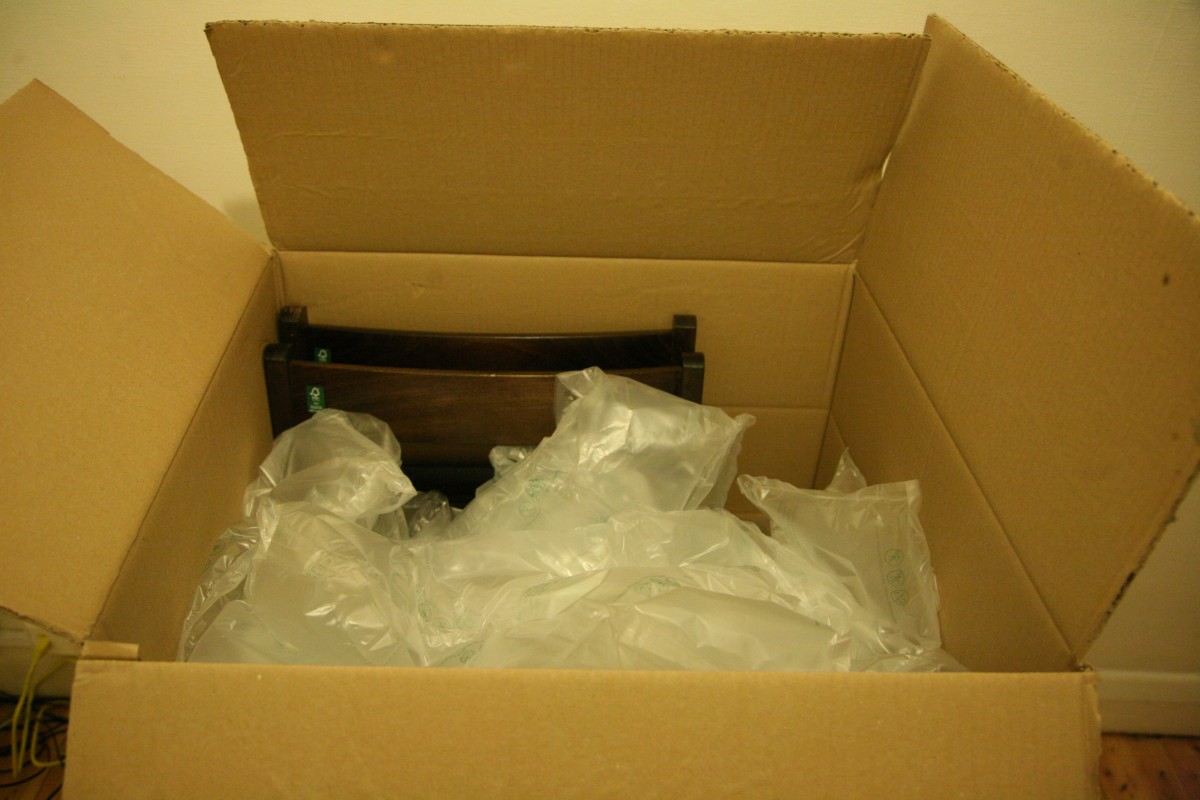
Another thing that I found rather puzzling was the size of the box. It would have made sense had it contained normal chairs. But folding ones: surely they'd be shipped folded? All was revealed when I opened the box:

The big box

The big box

You will note the green stickers on the left side of the chairs with the FSC logo advising me that those chairs are made from wood from well-managed forests. Brilliant! Unfortunately the amount of Air Pad packaging filling in the box probably offsets all eco-friendly credentials imparted by the FSC logo. On the plus side, it probably means that I now have enough air pads to send presents to my two nieces until they reach adult age (uncles are meant to spoil nieces and nephews, that's part of the job description).

Friday, 30 December 2011

Non-Exchangeable, Non-Refundable

I travelled on Eurostar today and learnt something about non-exchangeable, non-refundable tickets in the process so thought I'd share in case it can be useful to someone else. Eurostar sells several types of tickets in several classes (Standard, Standard Premier and Business Premier). The higher the class and the more flexible the ticket, the greater the price. So the cheapest tickets are non-exchangeable, non-refundable standard class tickets. Once bought, such tickets cannot be exchanged against another on a different train, cannot be refunded in case you don't want to travel anymore but they can most certainly be upgraded to the next travel class up, as I did today. Of course, it requires you paying an upgrade price, which may not be cheap. The fact that you can upgrade any ticket makes sense because:

  • An upgrade doesn't fall under the non-refundable rule because you're not asking for a refund, and in fact you're paying extra for the upgrade;
  • It doesn't fall under the non-exchangeable rule either because you're not asking for an exchange as you still want to travel on the same train at the same date: you just want to upgrade your existing ticket.

So if you ask general information staff in the station and are told that you cannot upgrade your ticket, don't take their word for it, go to the sales counter. The only reason why you would not be able to upgrade (and pay Eurostar more money) is if the travel class you want to upgrade to is already fully booked on your train.

Saturday, 28 May 2011

Crash of the Day

Received today from a colleague:

Please note that if somebody opens Build log excel in Microsoft excel 2007 and updates it while a filter put on any column, the file crashes.

So please avoid updating the build log in Microsoft excel 2007.

So we're talking about a fairy simple file created in Excel 2003 that crashes Excel 2007 if you try to update it while a filter is set on any column... Sigh...

Thursday, 21 April 2011

MS Works to MS Word: LibreOffice to the Rescue

I am at my mum's for Easter and one of the first things she asked me to look at had to do with her computer. She had this document that she wrote using Microsoft Works aeons ago that she wanted to open again. Of course, she's now using Microsoft Word and Word has no idea how to open Works files, even though both products are produced from the same software company.

What to do? The answer is very simple but rather counter-intuitive for people not used to open source software: LibreOffice. From the point of view of someone who lives in a world where closed source is the norm, how can a free office wannabe solve a problem that the mighty MS Office can't solve? Simple: as highlighted by Michael Meeks at FOSDEM earlier this year, LibreOffice wants to have the largest possible list of supported file formats so that they can support their users in reading their old documents stored in long forgotten format and hopefully migrate them to modern and preferably open document formats. As a result, LibreOffice supports MS Works and MS Word out of the box.

So back to my mum's document, retrieving the content was then very easy: copy the document to a USB key, open it on my laptop using LibreOffice, save it again and copy the new document back to her PC. In this case, it meant saving it back as an MS Word document. In an ideal world, I would have saved it as ODF and installed LibreOffice on her computer but I'll leave that for another day.

So if you have any old document lying around that you can't open anymore, try LibreOffice first, you'll be surprised how many weird and wonderful formats it supports. If it still doesn't work, consider contributing a filter to the project or at least reporting the issue and providing sample files so that the developers can build such a filter.

Tuesday, 1 February 2011

Outlook Error

In the meaningless error category, let me present today's effort by Microsoft Outlook:

Task 'Microsoft Exchange Server' reported error (0x8004010F): 'The operation failed. An object could not be found.'

Sunday, 30 January 2011

D-Bus Experiments in Vala

Most modern Linux desktop distributions now include D-Bus. It enables different applications in the same user session to communicate with each other or with system services. So I thought I'd experiment with D-Bus using Vala and starting with the published example.

Example 1: Ping Loop

I started with a simple ping client and server based on the example above, the main difference being that I added a loop in the client. The server code takes a message and an integer, prints out the message and the received integer, then adds one to the integer before returning the result:

[DBus (name = "org.example.Demo")]
public class DemoServer : Object {

    public int ping (string msg, int i) {
        stdout.printf ("%s [%d]\n", msg, i);
        return i+1;
    }
}

void on_bus_aquired (DBusConnection conn) {
    try {
        conn.register_object ("/org/example/demo",
            new DemoServer ());
    } catch (IOError e) {
        stderr.printf ("Could not register service\n");
    }
}

void main () {
    Bus.own_name (
        BusType.SESSION, "org.example.Demo",
        BusNameOwnerFlags.NONE,
        on_bus_aquired,
        () => {},
        () => stderr.printf ("Could not aquire name\n"));

    new MainLoop ().run ();
}

server.vala

And the client simply queries the server in a loop every second and prints out the input and output values:

[DBus (name = "org.example.Demo")]
interface DemoClient : Object {
    public abstract int ping (string msg, int i)
        throws IOError;
}

void main () {
    int i = 1;
    int j;
    while(true) {
        try {
            DemoClient client = Bus.get_proxy_sync (
                BusType.SESSION, "org.example.Demo",
                "/org/example/demo");

            j = client.ping ("ping", i);
            stdout.printf ("%d => %d\n", i, j);
            i = j;

        } catch (IOError e) {
            stderr.printf ("%s\n", e.message);
        }
        Thread.usleep(1000000);
    }
}

client.vala

Compiling both programs requires the gio-2.0 package:

$ valac --pkg gio-2.0 server.vala
$ valac --pkg gio-2.0 client.vala

Start the server followed by the client in two separate terminal windows and you should see them exchange data.

Example 2: Graceful Termination

The problem with the code above is that if the server process terminates while the client is still running, an exception occurs and the client doesn't recover. It would be nice if we could get the client to terminate gracefully when the server stops. The Vala GDBus library provides the ability to detect when a service comes up or is brought down using watches. When you setup a watch, you need a callback method for the watch to call. That callback method needs to be called on a different thread than the main client thread. This is handled by the MainLoop class but it means that the core client loop needs to be run in its own thread, which complicates the client code a bit. In the code below, the client code has been encapsulated into a Demo class and the client loop thread is controlled using a simple boolean attribute.

[DBus (name = "org.example.Demo")]
interface DemoClient : Object {
    public abstract int ping (string msg, int i)
        throws IOError;
}

public class Demo : Object {
    private bool server_up = true;
    
    private DemoClient client;
    
    private uint watch;
    
    private MainLoop main_loop;
    
    public Demo() {
        try {
            watch = Bus.watch_name(
                BusType.SESSION,
                "org.example.Demo",
                BusNameWatcherFlags.AUTO_START,
                () => {},
                on_name_vanished
            );
            client = Bus.get_proxy_sync (
                BusType.SESSION,
                "org.example.Demo",
                "/org/example/demo");
            server_up = true;
        } catch (IOError e) {
            stderr.printf ("%s\n", e.message);
            server_up = false;
        }
    }
    
    public void start() {
        main_loop = new MainLoop();
        Thread.create(() => {
            run();
            return null;
        }, false);
        main_loop.run();
    }
    
    public void run() {
        int i = 1;
        int j;
        while(server_up) {
            try {
                j = client.ping ("ping", i);
                stdout.printf ("%d => %d\n", i, j);
                i = j;
            } catch (IOError e) {
                stderr.printf ("%s\n", e.message);
            }
            if (server_up)
                Thread.usleep(1000000);
        }
        main_loop.quit();
    }
    
    void on_name_vanished(DBusConnection conn, string name) {
        stdout.printf ("%s vanished, closing down.\n", name);
        server_up = false;
    }
}

void main () {
    Demo demo = new Demo();
    demo.start();
}

client.vala

The server code is unchanged.

With this version, once the server and client are started, stopping the server through CTRL-C will notify the client which will then stop gracefully. You can even have multiple clients, they will all stop in the same way. The advantage of doing this is that the client has a chance to clean up any resource it holds before stopping.

Example 3: Peers and Service Migration

All of the above is great and we can now design client programs that share a common service. But when dealing with software that is started by the user, the client/server model is not always the best option: you need to ensure that the server is started before any client is and that it is only stopped after the last client has stopped. And what happens is the server fails? What would be really nice is if we could have peers: no difference between client and server, just a single executable that can be run multiple times, the first process to start acts as a server for the other ones and when it stops responsibility for the service is taken over by one of the other processes if any are still running. The last process to terminate closes the service. D-Bus makes it easy to implement for the following reasons:

  • Only one process can own a service;
  • All service calls go via D-Bus so a client process will not notice if the server process actually changes, as long as the service is still available;
  • The client and server processes can be the same process or different processes, it makes no difference to the client.

Therefore, the implementation of the peer program is simple:

  • Start the server, followed by the client and ignore any failure in starting the server: if another process has already started, the service will be available to the client;
  • When the peer is notified of the loss of service, try to start the server but ignore any failure: if another process was notified first, it will have started the server and there will be no interruption in service for the client thread.

We only need a single Vala file to implement the peer:

[DBus (name = "org.example.Demo")]
interface DemoClient : Object {
    public abstract int ping (string msg, int i)
        throws IOError;
}

[DBus (name = "org.example.Demo")]
public class DemoServer : Object {

    public int ping (string msg, int i) {
        stdout.printf ("%s [%d]\n", msg, i);
        return i+1;
    }
}

public class Demo : Object {
    private DemoClient client;
    
    private uint watch;
    
    public Demo() {
        // nothing to initialise
    }
    
    public void start() {
        start_server();
        start_client();
        new MainLoop().run();
    }
    
    public void start_client() {
        try {
            watch = Bus.watch_name(
                BusType.SESSION,
                "org.example.Demo",
                BusNameWatcherFlags.AUTO_START,
                on_name_appeared,
                on_name_vanished
            );
            client = Bus.get_proxy_sync (
                BusType.SESSION,
                "org.example.Demo",
                "/org/example/demo");
            Thread.create(() => {
                run_client();
                return null;
            }, false);
        } catch (IOError e) {
            stderr.printf ("Could not create proxy\n");
        }
    }
    
    public void run_client() {
        int i = 1;
        int j;
        while(true) {
            try {
                j = client.ping ("ping", i);
                stdout.printf ("%d => %d\n", i, j);
                i = j;
            } catch (IOError e) {
                stderr.printf ("Could not send message\n");
            }
            Thread.usleep(1000000);
        }
    }
    
    public void start_server() {
        Bus.own_name (
            BusType.SESSION,
            "org.example.Demo",
            BusNameOwnerFlags.NONE,
            on_bus_aquired,
            () => stderr.printf ("Name aquired\n"),
            () => stderr.printf ("Could not aquire name\n"));
    }
    
    void on_name_appeared(DBusConnection conn, string name) {
        stdout.printf ("%s appeared.\n", name);
    }
    
    void on_name_vanished(DBusConnection conn, string name) {
        stdout.printf (
            "%s vanished, attempting to start server.\n",
            name);
        start_server();
    }

    void on_bus_aquired (DBusConnection conn) {
        try {
            conn.register_object (
                "/org/example/demo",
                new DemoServer ());
        } catch (IOError e) {
            stderr.printf ("Could not register service\n");
        }
    }
}

void main () {
    Demo demo = new Demo();
    demo.start();
}

peer.vala

Start several peers in different terminal windows, at least 3 or 4. You will notice that the first process starts a server thread that all client threads connect to. When the process that provides the service terminates, the next process in the chain takes over the responsibility for the service. And finally, when the last process terminates, the service is closed.

Note that if you want to check D-Bus activity while running the programs in this introduction, you can either install the D-Feet tool or run dbus-monitor from the command line.

The Devil's in the Details

A good piece of software should make boring, repetitive and error prone tasks easy. One of them that photographers face regularly is resizing a batch of images. The typical situation is the day after a party when everybody wants a copy of the photos you took, either by email or on a CD. Quite often, people don't want the full size but they'd quite like copies of all the photos. I found myself in such a situation on New Year's Day: 150-odd photos that needed resizing and burning to a CD. Luckily, I had my trusty Ubuntu laptop running Shotwell. Shotwell does exactly the right thing when you want to export photos: it allows you to resize them all to a size that you specify, as shown in the dialog below:

Shotwell's export dialog

Shotwell's export dialog

My laptop took a few minutes to resize all 150 photos when I exported them. Next to me was a friend who uses a proprietary operating system that shall remain nameless and who commented: Wow, that's cool! When I do that, I have to resize each photo manually and it takes ages! Sometimes the best features are the simple ones.

Monday, 6 December 2010

Web accessibility – Code of practice

BSi have just released a new British Standard, BS 8878:2010 Web accessibility – Code of practice. First things first, this is not another set of web accessibility guidelines. This document is meant to complement existing guidelines such as WCAG and provide a framework for companies to implement accessible web products. It recognises that accessibility goes well beyond HTML tags and requires the right processes to be in place in the organisation, from planning for accessibility to delivering and testing it. To quote from the standard itself:

This British Standard sets a standard for the quality of the process of creating accessible web products, rather than a standard for the quality of accessibility of web products resulting from it.

I've only had time to quickly browse through it and I'll do a more thorough write-up when I can. First impressions are very good and it's no surprise considering that AbilityNet, who are one of the most knowledgeable organisations on the subject, made significant contributions to it. The document is clearly and concisely written, there's no jargon unless absolutely necessary and it includes an awful lot of useful information, such as how to build a business case for accessibility, what processes to put in place to deliver it, how to make justifiable decisions on accessibility, write an accessibility policy, etc. It is also very pragmatic and concentrates on the ultimate goal, delivering accessibility efficiently, rather than on specific processes and guidelines.

So if you're about to start a new web project, grab a copy of BS 8878 and ensure that what you deliver is accessible to all: there is no excuse!

Sunday, 7 November 2010

Reading Paradise... or DRM Hell?

New Toy

Yesterday, I bought myself a Sony PRS-650 Reader Touch Edition as a belated birthday present. I could have bought the new Kindle, as there are lots of adverts for it in the tube, it's cheaper and it has Wi-Fi. I went for the Sony PRS reader instead because I don't really need Wi-Fi and it has a touch screen, which means that it's not encumbered by a keyboard and is therefore a lot smaller for the same screen size (6" display). The Sony device does really fit in a pocket as it's about the size of a very thin paperback. If you want even smaller, you can get the Pocket edition, a.k.a. PRS-350.

So the first thing I did was go to Waterstone's as I know they stock the PRS-650. Unfortunately, between two shops I visited, they had 5 demo devices, only one of which seemed to work and no staff in sight to help. So I ended up going to the Sony Centre in Tottenham Court Road, where I was served by very helpful staff who were happy to answer any question and demo the device. What's more, if you buy the device from Sony direct, you can also have it in a very nice red colour that is much less boring than the black and grey offered by Waterstone's.

Back home, I installed calibre from the Ubuntu repositories and, lo and behold, my new toy was immediately recognised and supported out of the box! On a side note, the connection is a standard Micro-B USB connector, which means that the cable to connect it to the computer and charge it is the same as with my Nokia N900.

But getting the device to work is only the start, you then need to load it with books. The PRS-650 supports a variety of file formats and whatever it doesn't support, calibre should be able to convert to EPUB. So you basically need to find books to download. Here's a quick list of what I tried.

The Good

  • The first thing to do when you get your Sony reader is to register it on My Sony, you will then be able to download 100 free classic books in Sony's own format, including titles like Don Quixote, Gulliver's Travels, The Importance of Being Earnest or David Copperfield.
  • If you want more classics, Project Gutenberg is the place to go to: thousands of books in a variety of languages for which the copyright has expired.
  • If you are into science fiction, Baen Publishing offer most of their titles as non-DRM e-books that you can then load into calibre. They even offer some of them for free through their free library.
  • For technical books, both The Pragmatic Bookshelf and O'Reilly offer their titles in a variety of formats without DRM.

The Bad

  • Waterstone's, WHSmith, Penguin, rbooks (Random House) and kobo will only sell you DRM-encumbered books that require Adobe Digital Editions, which of course doesn't exist for Linux. Apparently it works well under WINE but Adobe won't offer the Windows download if you connect to their web site using Ubuntu. It also means that you are forced to use a particular piece of software, which may or may not be practical. Add to this that, apart from kobo, the other web sites are not very forthcoming with that information so you may end up buying an e-book that you can't download and only discover that after you've actually paid for it!
  • Amazon, quite predictably, will only sell you books for the Kindle but won't let you download the file, you have to use either a Kindle device or the Kindle software, which only works on Mac OS-X or Windows and won't work with the Sony reader anyway.

The Ugly

  • Foyles and Books, etc. have a web site that seems to be able to show me e-books or fiction books but not fiction e-books so I was unable to find what I wanted and eventually gave up.
  • Blackwell's seem to have a very limited list of titles available as e-books so I gave up and also failed to find out any information on the e-book formats they offer and whether they were DRM-encumbered.

It looks like the publishing industry is following blindly in the footsteps of the music industry, leaving very few options for Linux users to buy e-books legally. And as usual it's not a question of hardware support, it's all about restricting what customers can do with the media they purchase. Surely, there must be a better solution than this mess?

Update 1

I originally thought that The Book Depository didn't offer e-books but in fact they do and, like a number of others, only sell DRM-encumbered books, require you to use Adobe Digital Editions and don't tell you until you've actually bought the book. So that's one more candidate for the bad list above.

Update 2

I mistakenly said above that The Book Depository didn't warn you about the requirement for Adobe Digital Editions. In fact they do, just not in a place where I was expecting it so I didn't notice it. As a result they won't refund you if you mistakenly buy an e-book that you can't download.

WHSmith also mention that you need Adobe Digital Editions. However, they do that at the very bottom of the book's page below adverts for other e-books and customer reviews, so not quite as prominently as you would expect. They won't refund you either if you make a mistake.

rBooks will refund you if you ask them politely.

Update 3

Waterstone's will refund you too if you ask politely.

Sunday, 17 October 2010

R.I.P. Benoit Mandelbrot

Benoit Mandelbrot passed away on Thursday at the age of 85. He last talked about his work at TED2010 earlier this year.

I remember being fascinated by images of the Mandelbrot set when I was a child and I did a series of articles last year on how to create them using GNU Octave so if you want to have a go yourself, feel free to grab the code and follow the examples.

Thursday, 9 September 2010

Of the Perception of Open Source Tools

Today, while discussing options for an identity federation solution, I had the following comment from one of my colleagues (I paraphrase as I don't remember the exact words):

The advantage with a Microsoft product compared to an open source product is that you get a good administration interface.

Note that no specific package had actually been mentioned so this was an obvious generalisation which may or may not be true. However, irrespective of the validity of the statement, why is it that some IT professionals have this view of open source software? Is there any grounding in this comment? And is there something that we, as the open source community, can do to change this mindset?

Sunday, 5 September 2010

Adding Support for Alien Database Import in Shotwell

When developing the import from F-Spot feature in Shotwell, I made sure I isolated the F-Spot specific code from the generic code so that the same feature could be easily implemented to import photographs from other photo management application. So if you want to contribute an import from Picasa feature, here's a quick guide on how to do it.

Alien Database Framework

Everything you need in order to implement a new import feature is provided by the alien database framework. It is composed of 5 classes that you will need to know about and 5 interfaces that you will need to implement, as shown in the class diagram below:

Alien database framework class diagram

Here's a quick overview of the different components:

AlienDatabaseHandler
The class where everything starts from. This object is responsible for managing a set of drivers. At the moment, there is only one, the F-Spot driver but hopefully, by the time you finish reading this, there will be a new one.
AlienDatabaseDriverID
A light-weight struct that identifies a unique driver. This struct wraps a simple string. In the case of the F-Spot driver, that string is f-spot.
AlienDatabaseDriver
The interface that specifies what the driver implementation needs to provide. It includes a few simple methods that enable the driver support to be included in the Shotwell interface, as well as three more heavy-weight methods that actually perform the database handling. Those methods are called in two steps:
  1. get_discovered_databases is called first so that the driver can provide the UI a list of databases that are automatically discovered, typically database files found in well known locations such as ~/.config/f-spot/photos.db for F-Spot;
  2. open_database or open_database_from_file gets called when the user has selected what database to load: those are the methods that will do the heavy lifting.
DiscoveredAlienDatabase
A light-weight wrapper that identifies a discovered database and implements lazy loading of the real database.
AlienDatabaseID
A light-weight struct that behaves exactly the same as AlienDatabaseDriverID but uniquely identifies a given database, including its related driver.
AlienDatabase
The interface that specifies what the database implementation needs to provide. The method that does all the work is get_photos.
AlienDatabaseVersion
A light-weight class that implements a version number in the format x.y.z and is able to compare versions between each other. This is meant to make it possible to validate whether the version found is actually supported by the driver. This is also used heavily in the F-Spot implementation to provide support for different versions of the database.
AlienDatabasePhoto, AlienDatabaseTag and AlienDatabaseEvent
A set of interfaces that define data objects handled by the database: photos, tags and events.

Implementing a new driver

Now that you've decided to implement a new driver, let's go through it step by step.

Driver implementation

The first thing to do is to provide an implementation of the AlienDatabaseDriver interface. Let's get the UI related methods out of the way first.

get_id
This should return a hard-coded AlienDatabaseDriverID used to identify the driver.
get_display_name
This should return a display name, most likely the name of the application the driver is for. You may want to make it translatable if you know that the application doesn't have the same name in all languages.
get_menu_name
The name to be used for the menu identifier, which is referenced in the action (see below). This should be a simple hard-coded string.
get_action_entry
A method that returns a Gtk.ActionEntry that will be used to construct menu items. The return value should be hard-coded and be consistent with what the get_menu_name method returns. I know, it looks like there's redundant code in there but it seems that Vala has issues with building structs with non-hard-coded strings. This may be simplified in the future. Don't forget to set the label and the tooltip for the action and to make them translatable: see the F-Spot implementation for an example.

That's the UI out of the way. Now let's have a look at database discovery and load.

get_discovered_databases
This method will be called when the user selects the import menu item and the dialog box appears. It should look in all the well-known locations for a database and return a collection of DiscoveredAlienDatabase objects. Those objects are created from an AlienDatabaseID object that contains two pieces of information: the driver ID and a driver specific string that identifies the database. That driver specific string can be whatever you want. At its simplest, it can just be the path to the database file.
open_database and open_database_from_file
Those two methods are the ones that do the heavy lifting. They basically provide exactly the same function with a slightly different signature so you will probably want to factorise the code and make both of them call an internal private function that performs the bulk of the work. At this point, you need to open the database file and extract the version number out of it. If there is any error, it's the time to report it as this is called while the import dialogue is still displayed to the user and can provide early feedback. There are two error domains you can use for that: use DatabaseError for any generic database issue, such as problems opening the file or reading the tables; and use AlienDatabaseError to report a database that you can read but which has a version number that you don't support. If everything goes well, return an implementation of AlienDatabase.
Database implementation

Now that you've loaded the database, it's time to extract data out of it. For that purpose, you now need to provide an implementation of the AlienDatabase interface. Once again, there are a few UI related methods and some data related ones so let's start with the UI bits.

get_uri
This method returns the driver specific URI for this database. It must be consistent with what is used in the AlienDatabaseID struct.
get_display_name
A string that is suitable for display in the UI and that identifies the database to the user.

And now for the bulk of the implementation:

get_version
Return the version of this database. By the time this method is called, the database should already have been opened so it should only fail if something really unexpected happens.
get_photos
This is the important method, where the content of the database is read and photo references are extracted. Try to be as lenient as possible in this method so that it doesn't throw an exception. If an unexpected piece of data is returned, try to recover from it rather than throw an exception. If a photo entry can't be read properly, just ignore it and continue with the next one. Throwing an exception will abort the whole import so make sure you only do it if you're absolutely sure that you can't do anything else.
Data objects implementation

The last three interfaces define light-weight data objects that should all be created by the get_photos method in the AlienDatabase implementation. I will only detail AlienDatabasePhoto as the other two are trivial and only return a name.

get_folder_path and get_filename
Both strings together provide the fully qualified path of the image file for the photo.
get_tags and get_event
Return the objects that contain the details of the tags and event for the photo. Note that because Shotwell only supports one event per photo, only a single instance can be returned, not a collection. Also note that because Shotwell does not currently support hierarchical tags, all tags just contain a name. If the database you import from supports hierarchical tags, you should decide whether you want to import all tags or only leaf tags.
get_rating
Return a five-star rating for the photo. If the database you import from doesn't support ratings, just return Rating.UNRATED. If your rating is stored as an integer, use the Rating.unserialize method.
get_title
A title for the photo, if the source database supports it. Otherwise, return null.
get_import_id
This method returns a values that identifies an import roll. It should be a value that is equivalent to a time stamp. If the source database doesn't support this, just return null.

Register your driver

The only thing left to do is to register your new driver with the handler. For this, you will need to modify the AlienDatabaseHandler constructor to add a call to register_driver with an instance of your driver. I know, this is not ideal but there is a ticket on the Yorba tracker to implement a real plugin mechanism. Once this is done, this last step should go away. And as an added bonus, if libpeas is used for this as expected, you should then be able to write your plugins in other languages than Vala!

Go and write great code!

That's it. If you want to enable import from your (old) favourite photo management application to Shotwell, just follow this guide and contribute a patch. Of course, the reality of things means that it will probably not be that simple, it all depends on the complexity of the source database. You may also want to be able to support several versions of that source database. For an example on how to do this, have a look at the F-Spot implementation.

Sound Issue in Ubuntu 10.10 Beta

This morning when logging in to my newly-upgraded-to-Ubuntu-10.10 laptop, sound was not working. It appears that the solution was very simple: my user was not authorised to use audio devices. I don't know why it was disabled as it had always worked fine before but it's very easy to solve so if you have the same problem check that first. To resolve it, go to System → Administration → Users and Groups, select your user, click on the Advanced Settings button, enter your password, click the User Privileges tab and make sure the Use audio devices box is checked. While you're at it, do the same for the other users on your system.

User Settings dialogue

If that doesn't work, there is a handy wiki page on debugging sound problems.

Saturday, 4 September 2010

Memory Usage Graphs with ps and Gnuplot

When developing the import from F-Spot feature in Shotwell, a user who tested the patch found out that there was a bit of a memory leak. After finding the cause, I produced a patch to fix it but I also wanted to identify what the difference was between the development trunk and the patch. So here's how I did it.

Gathering Data

The first step was to gather relevant memory usage data. For this I needed a repeatable test and perform that test both with the trunk build and the patch build. As I had a test F-Spot database, that proved quite straightforward:

  1. Delete the Shotwell database,
  2. Build the trunk version,
  3. Import the test F-Spot database using the trunk build,
  4. Delete the Shotwell database again,
  5. Build the patched version,
  6. Import the test F-Spot database using the patched build.

With the test process sorted, I needed to gather memory data during steps 3 and 6. That's easily done using the ps command in a loop and sending the output to files. So, for the trunk build, I just started this command in a terminal before starting Shotwell and stopped it once finished:

$ while true; do
ps -C shotwell -o pid=,%mem=,vsz= >> mem-trunk.log
sleep 1
done

The one for the patched version is virtually the same:

$ while true; do
ps -C shotwell -o pid=,%mem=,vsz= >> mem-patch.log
sleep 1
done

Note the the equal sign (=) after each field specification tells ps not to output the column header. So at the end of this, you end up with two files that contain 3 columns of data each: the PID, the percentage of memory used and the total virtual memory used for the process at intervals of one second. In both cases, I let Shotwell run idle for a few seconds at the end of the import before closing it to ensure that everything had stabilised.

Next, I checked how many lines of data I had in each file:

$ wc -l mem-*.log

And truncated the longer file to the length of the sorter one, just to make sure I had the same number of data points for both.

Creating the Graph

After that, I wanted to create a single graph that included four lines: VSZ and %MEM for both trunk and patch. And I wanted to output the result to a PNG file. Gnuplot can do all of this, you just need to know how to set its myriad of options. So here's the Gnuplot script in details.

set term png small size 800,600
set output "mem-graph.png"

Gnuplot works with the concept of terminals. So the first line tells it to use the special terminal called png with a small font and a size of 800 pixels wide by 600 pixels high. The second line is fairly self-explanatory: output to the given file.

set ylabel "VSZ"
set y2label "%MEM"

The two sets of values I am interested in have very different ranges. VSZ is a number of bytes and will have values in the hundreds of thousands if not millions, while %MEM is a percentage so will have a value somewhere between 0 and 100. So to make sure that both types of graphs fit in the output, I will use the ability that Gnuplot has to use left and right Y axes with different ranges: VSZ will go on the default Y axis (left, called y), while %MEM will go on the other one (right, called y2). So I set the labels for both.

set ytics nomirror
set y2tics nomirror in

As the right Y axis is not used by default, I need to enable it and to set where the tics go. To do that, I first disable the mirror option on the left Y axis and enable tics on the right Y axis by telling Gnuplot that their position will be in.

set yrange [0:*]
set y2range [0:*]

The last piece of setup is to customise the range on both axes. By default, Gnuplot will adjust the range so that there is as little white space as possible above or below the graph. But in this case, I want both sets of graphs to start at zero so that I can have a better idea of total memory used.

The next bit is quite long so I will start by explaining the instruction for a single graph before bringing all four together.

plot "mem-trunk.log" using 3 with lines axes x1y1 title "Trunk VSZ"

In the line above, I tell Gnuplot to take its data from the third column in the file called mem-trunk.log. The with lines section specifies that I want a line graph. The axes x1y1 specifies that I want it to be drawn against the first X axis and the first Y axis (the default, but here for completeness). And the last bit specifies what I want the title for this graph to be. Then it's just a case of plotting all four graphs in a single plot command separated by commas. So here's the full script:

set term png small size 800,600
set output "mem-2334-graph.png"
set ylabel "VSZ"
set y2label "%MEM"
set ytics nomirror
set y2tics nomirror in
set yrange [0:*]
set y2range [0:*]
plot "mem-trunk.log" using 3 with lines axes x1y1 title "Trunk VSZ", \
     "mem-patch.log" using 3 with lines axes x1y1 title "Patch VSZ", \
     "mem-trunk.log" using 2 with lines axes x1y2 title "Trunk %MEM", \
     "mem-patch.log" using 2 with lines axes x1y2 title "Patch %MEM"

Make sure that there is absolutely no white space between the backslash characters and the end of lines in the plot command otherwise Gnuplot will complain. Save the script to a file called mem.gnuplot and run it:

$ gnuplot mem.gnuplot

And here is the output I got, which shows the improvement in memory usage between trunk and patch:

Memory usage graph